Showing posts with label vlan. Show all posts

Saturday, 1 April 2023

VLAN Hopping

In today's world, where network security is crucial, VLAN hopping is one of the most common and dangerous threats to network infrastructure. VLAN hopping is a network security vulnerability that occurs when an attacker gains unauthorized access to a network by exploiting VLAN tagging protocols.

VLANs or Virtual Local Area Networks are a type of network that allows the creation of multiple logical networks within a single physical network. Each VLAN is identified by a unique VLAN ID, which is used to tag and separate traffic from different VLANs. VLAN tagging is done at the data link layer of the OSI model and is used to allow network administrators to create separate broadcast domains within a single physical network.

VLAN hopping occurs when an attacker gains unauthorized access to a VLAN by exploiting the vulnerabilities in the VLAN tagging protocol. There are several ways that an attacker can carry out a VLAN hopping attack, including Double Tagging, Switch Spoofing, and VLAN Injection.

Double Tagging:

In this type of VLAN hopping attack, the attacker sends a frame with two VLAN tags to the switch. The first tag is the attacker's VLAN ID, and the second tag is the target VLAN ID. The switch reads the first tag and places the frame in the attacker's VLAN. However, the switch also reads the second tag and forwards the frame to the target VLAN, giving the attacker access to the target VLAN.

Switch Spoofing:

In a switch spoofing attack, the attacker sends a frame with a spoofed MAC address of the switch to the target VLAN. The target VLAN receives the frame and forwards it to the switch, which reads the MAC address and places the frame in the appropriate VLAN. However, the switch does not realize that the frame has been spoofed, and it sends the frame to the attacker's VLAN as well, giving the attacker access to the target VLAN.

VLAN Injection:

In a VLAN injection attack, the attacker sends a frame to the switch with a VLAN tag that does not exist on the network. The switch reads the VLAN tag and creates a new VLAN for the frame. The attacker can then use this VLAN to gain unauthorized access to the network.

To prevent VLAN hopping attacks, network administrators should implement VLAN security best practices. These best practices include:

1. Implementing Port Security: Port security can be used to restrict the number of MAC addresses that can be learned on a port. This prevents attackers from spoofing MAC addresses and gaining access to other VLANs.

2. VLAN Access Control Lists (ACLs): VLAN ACLs can be used to restrict traffic between VLANs, preventing attackers from moving between VLANs.

3. VLAN Trunking Protocol (VTP) Security: VTP is a protocol used to manage VLANs on a network. Implementing VTP security prevents unauthorized changes to VLAN configurations.

4. Regular Security Audits: Regular security audits can help network administrators identify vulnerabilities and implement security measures to prevent VLAN hopping attacks.

In conclusion, VLAN hopping is a serious threat to network security that can be exploited by attackers to gain unauthorized access to a network. By implementing VLAN security best practices, network administrators can prevent VLAN hopping attacks and keep their networks secure.


Thursday, 9 February 2023

Inter VLAN routing

Hosts cannot communicate with hosts on a separate VLAN unless there is a configured router in place. Inter VLAN routing is the process of forwarding one VLANs traffic to another.

The two main options for inter VLAN routing are;

1. Router on a stick for small - medium businesses

2. Layer 3 switches that use SVI's - large enterprises

A router on a stick

The router on a stick method only requires one physical ethernet interface to route traffic between multiple VLANS. This sub interface on a Cisco router is configured as a trunk connecting to a layer 2 switch using the 802.1Q protocol. the configured sub interfaces are software based and each is configured with an independent IP address and VLAN assignment. When VLAN- tagged traffic enters the router interface it is forwarded to the VLAN sub interface, then a routing decision can be made based on the destination IP address. This method does not scale beyond 50 VLANS. See below video for a simple practical scenario for configuring the router on a stick method and an image showing which interface the configurations need to take place;


Layer 3 Switching or Multilayer Switching

The router on a stick method is limited in scalability so larger organisations would be recommended to use a multi layer switch. A multi layer switch can;
-Route between VLANs using switch virtual interfaces (SVIs)
-Be configured with different methods of routing ie OSPF (This will be discussed in a later lesson)

In packet tracer the multi layer switch looks like the below. We will configure these when we discuss routing


From this post and the last lesson you should now be ready to excel in this Quiz

Friday, 3 February 2023

VLANs - Virtual Local Area Networks

 What is a VLAN?

A VLAN is configured on a layer 2 switch. It allows  a group of multiple devices to be combined into one logical network and administered like a physical network on a single logical interface. VLANs are represented by a number, common ranges are between 1-4094. A configured VLAN keeps network traffic within a broadcast domain to reduce CPU overhead and increase security.

Advantages of VLANS

- Reduces CPU overhead
- Reduces cabling costs 
- Simplified management
- Traffic management 
- Separate devices into groups regardless of location 

Types of VLANs

A default VLAN is assigned to VLAN1. This cannot be renamed or deleted. It is the default VLAN, the default Native VLAN (a native VLAN doesn't originate from a VLA N port) and the default VLAN management VLAN (for remote SSH and telnet connections)

Data VLAN

The data VLAN is dedicated for user specific traffic such as web or email, again VLAN1 is the default interface for this type of traffic.

Native VLAN

A Native VLAN is used for trunk links and all frames are tagged with Cisco's propriety protocol 802.1Q

Management VLAN

Used for SSH and telnet connections and should not be used to carry end user traffic as a security measure


Voice VLAN

A voice VLAN is a separate VLAN for voice traffic. High bandwidth and QOS rules are applied to avoid congestion. For a voice VLAN to be effective the entire network and supporting infrastructure needs to be designed around high performance.

Inter VLAN communication

VLANS on a layer 2 switch keep traffic within a single broadcast domain. But what if you want inter vlan communication and not use a router? For this to be possible you need to have access to layer 3 switch or multi layer switch. Here you create a layer 2 vlan and then assign an IP address to the layer 3 switch much like you would on a router. This interface is call a switch virtual interface (SVI). This interface will handle the communication between vlans within sperate broadcast domains.

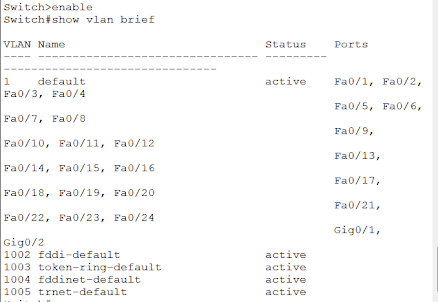
Viewing VLAN configurations

Below the show vlan brief command is used to show VLAN statuses.


VLAN configurations

VLAN creation

For starting to configure a VLAN follow the below steps. In this example the vlan id is 10 and the name assigned to it is FOC.


When you enter the show vlan brief command you can now see VLAN 10 in the list at the bottom.


Assigning a VLAN to a port

In the below example, VLAN 15 has been assigned to the FA0/18 port


Again when the show vlan brief command is entered we can see the assignment


Data and Voice VLAN creation

For creating data and voice vlans we will need to name and assign both. In the below example we have turned on qos for voice traffic for the interface.


Now when the show vlan brief is entered we get the below information and both voice and data have been assigned to FA0/10


VLAN trunks

If you want to group VLANS together into one single physical interface you use the trunking method. Here we have assigned VLAN 10,15,30 and 40 to interface FA0/1 . This could merge staff, students, marketing and hr departments together into one single physical interface.


Now when we look at the interface in more detail through the show interface fa0/1 switchport command we can see all the details. Note 802.1q is enabled which is assumed on a layer 2 switch but on a layer 3 switch 802.1q will need to be configured before the trunk mode.


Dynamic trunking

Dynamic trunking is used to auto create trunks between two switches. This can lead to problems such as increasing traffic. On some cisco switches such as the catalyst 2960 the Dynamic trunking protocol (DTP) is on by default. But  can be turned off with the nonegotiate command:


Other switch port commands

Use the switchport mode command  + the below to get the desired outcomes

access - permanent access mode and converts neighbouring link into an access link
dynamic auto - will become a trunk interface if the neighbouring link is set to trunk or desirable mode
dynamic desirable - actively seeks to become a trunk by negotiating with other trunks with auto or desirable configured
trunk - permanent trunking mode and negotiates to convert the neighbouring link into a trunk link

For basic vlan configurations follow the below video;


Monday, 30 January 2023

SSH vs Telnet - Configure both

Knowledge

SSH and Telnet are both protocols for remote access, but there are differences between the two:

Security: SSH provides encrypted communication, while Telnet is insecure and sends data in clear text.

Port numbers: SSH uses port 22, Telnet uses port 23.

Functionality: SSH provides secure terminal emulation and also supports file transfers, while Telnet only provides terminal emulation.

Authentication: SSH uses public key and password-based authentication, Telnet only uses password-based authentication.

In general, SSH is preferred over Telnet for remote access due to its security and additional functionality.

Skill

SSH

Setting the environment


Make a small network environment similar to the below


Configure the interfaces


Below shows the router configuration for interface gigabitEthernet 0/0/0 with an ip address of 172.16.0.1 and the default subnet mask of 255.255.0.0


Configure the ssh encryption keys


Below are the commands to generate encryption keys. The domain name given is FOC, the router name is changed to FOC1 and the bits assigned is 1024. (the greater the number the higher level of encryption but speed is impacted


Configure the password for ssh login


Here the password is set to friends. Line vty simply means that 16 simultaneous connections can be made. 


Testing


On the command prompt of the pc. Type the ssh -l ..... (then the username and the ip address)

You should now have access via ssh (make sure to type an IP address into your PCs configuration that is on the same network ie 172.16.0.2)


Telnet


Similar to the previous example build a small simulation environment like the below.


Secure the Switch


Set the password for the executive mode, this will be used after the remote login password


Configure the VLAN


Configure interface vlan 1 and give it an IP address


Configure remote login with telnet


Configure the number of simultaneous connections and set the remote login password


Testing

Don't forget to give your PC/laptop an IP address within the same subnet. Telnet + the IP address of the switch. Here I will use the remote login password "friend" and after enable the switch config password "friends"


Higher thinking

There are two methods of remote access here, one with a higher level of security than the other. Do they both have a use within organisations, can you think of when and why these may be. 

Fast switching vs Process switching

Process Switching: Process switching is the traditional method of packet forwarding used in early routers. When a packet arrives at a router...